LLM-Based Scanning
LLM-based scanning complements rule-based SAST. LLM-based scanning uses probabilistic reasoning to find and analyze vulnerabilities independent of language syntax and detects vulnerabilities in languages and extensions not supported by SAST.
Tip
Enable LLM-Based scanning for codebases with multiple languages not fully covered by SAST rules.
Choosing Your Configuration Level
Use the following table to help determine where best to enable LLM-based scanning:
Where to Enable | When to Enable |
|---|---|
Tenant-level | Enable if your organization uses many languages; all projects inherit LLM-based scanning by default. |
Project-level | Enable for specific high-risk or multi-language projects; fastest path for selective use. |
Scan-level | Enable via your config as code file (config.yml) for specific scans or temporary testing without changing project settings |
Enabling LLM-based Scanning
LLM-based scanning is configured at the tenant, project, and scan levels.
Important
Ensure that the AI toggle is enabled: Select  > Global Settings > AI, and then under AI Capabilities , ensure Allow AI Usage is toggled on.
If Allow AI Usage is OFF, LLM-based scanning will not run even if enabled at project or scan level!
For scanning using API, see here.
To enable LLM-based scanning at the tenant-level: Go to
> Global Settings > SAST >, and set LLM-based Settings to true.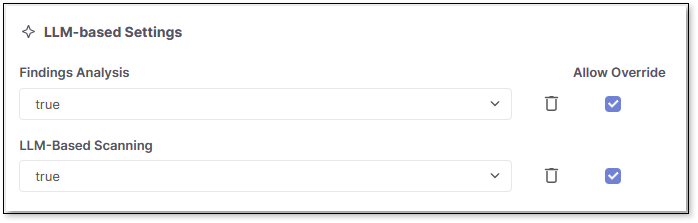
To enable LLM-based scanning at the project level: Go to Projects > at the end of the project's row select
 > Project Settings > Rules, and then set LLM-based scanning to true.
To enable LLM based scanning on the scan leveI: add the parameter:
extendedAnalysis: 'true'under the sast section in your configuration file (config.yml). See Configuring Projects Using Config as Code Files and, specifically, the LLM-based scanning SAST parameter for more information.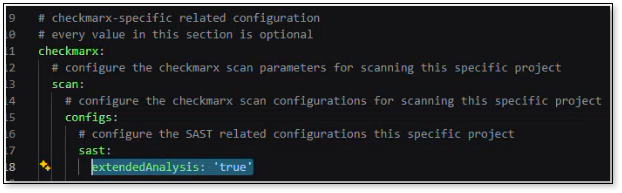
Alternatively, you can enable LLM-based scanning as a rule when you first create the project. See Creating Projects for more information on rules when creating projects.
Understanding Results
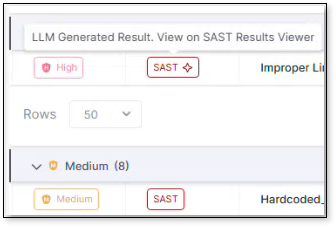
Each finding displays whether it was detected by SAST rule-based scanning or LLM-based scanning. LLM-based scan results are denoted with a star in their tag in Risk Orchestration and in their own dedicated column in the SAST results viewer. For more information on viewing and understanding results see SAST Results Viewer.