Code Repository Integration Usage & Results
Overview
This document describes how Checkmarx One integrates with source code management (SCM) platforms to automatically scan code and provide security feedback throughout the development lifecycle.
Checkmarx One currently supports integration with GitHub, GitLab, Azure DevOps, and Bitbucket.
Security scans can be triggered by:
Push events
Pull requests
Push-triggered scans and pull request-triggered scans provide different types of feedback and results. The following sections describe the behavior and expected outcomes of each workflow.
Push Event Scanning
When code is pushed to a branch in a connected repository, Checkmarx One automatically initiates a scan of the updated codebase.
Push-triggered scans execute in Checkmarx One. Once the scan is complete, the results become available in the Checkmarx One UI.
Unlike pull request scans, push-triggered scans do not enrich the source code management platform with scan summaries, comments, or vulnerability reports. All scan findings must be reviewed directly in Checkmarx One.
Expected Behavior
When a push event occurs:
A push event is detected by the repository integration.
Checkmarx One creates a new scan for the associated project.
When the scan completes, the results become available in Checkmarx One.
Viewing Results
To review the results of a push-triggered scan:
Open the project in Checkmarx One.
Locate the newly created scan.
Open the scan results.
Review findings from the enabled scanners.
Pull Request Scanning and PR Decoration
When a pull request is created in a connected repository, Checkmarx One automatically initiates a scan and enriches the pull request through Pull Request (PR) Decoration.
PR decoration provides security feedback directly within the pull request workflow, enabling developers and reviewers to identify and address security issues before code is merged into the target branch.
Expected Behavior
When a pull request is created or updated:
The repository integration detects the pull request event.
Checkmarx One initiates a scan for the pull request.
A scan-in-progress notification is displayed in the comments section of the pull request.
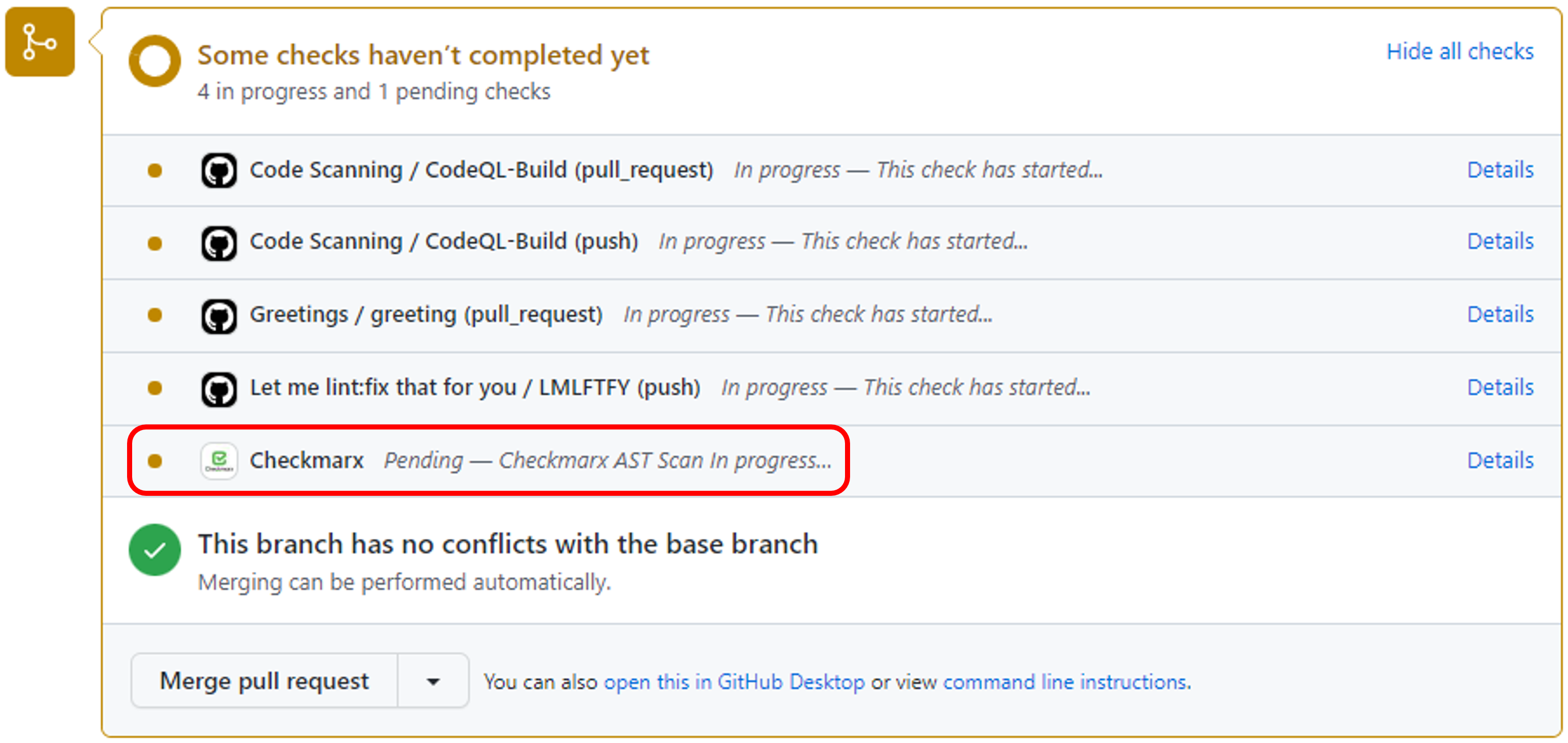
When the scan completes, the pull request decoration is updated with the scan results.
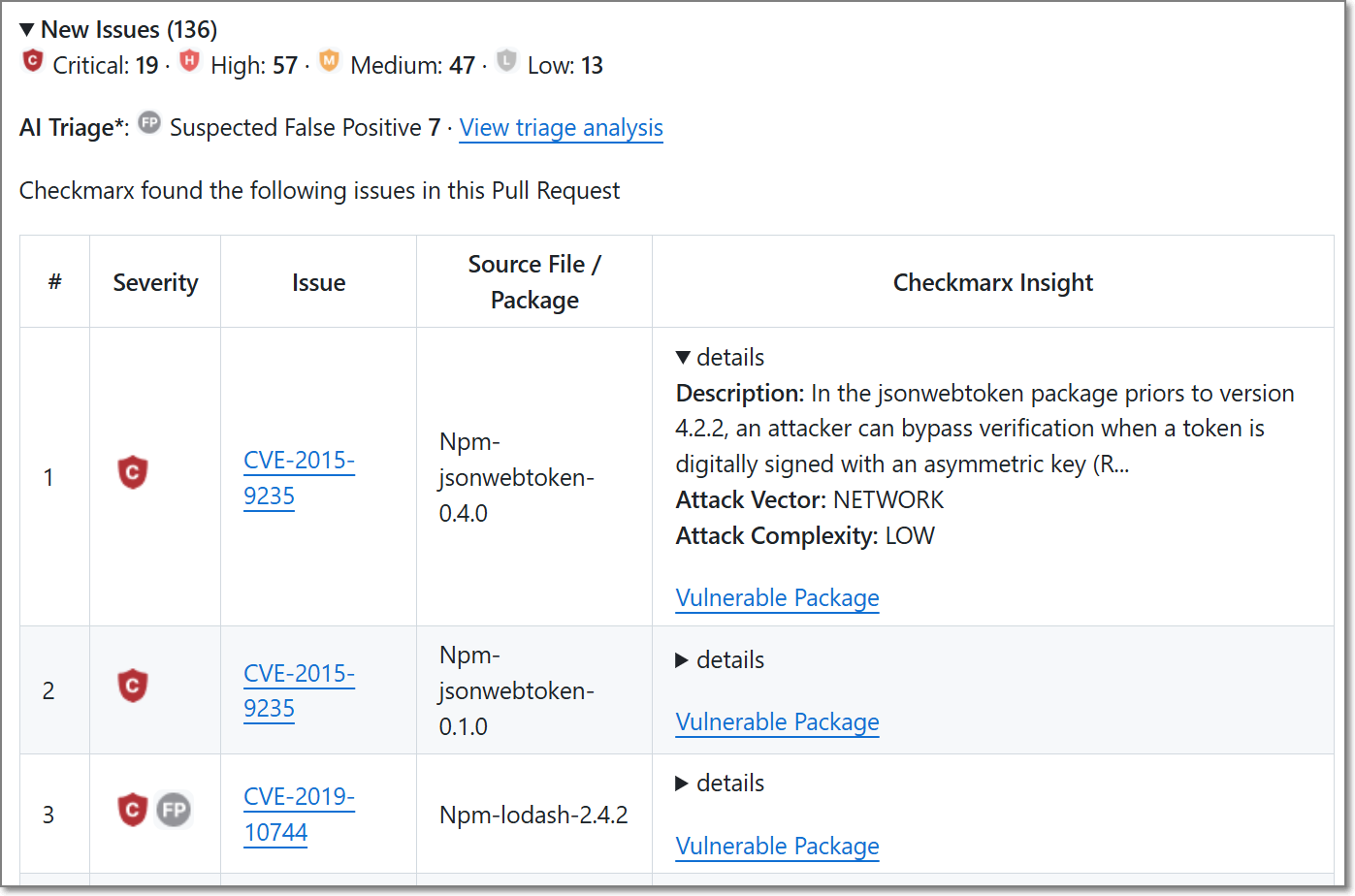
Information Displayed in the PR Decoration
Depending on the SCM platform and integration configuration, the pull request may display:
Scan status notifications
Scan completion notifications
A summary of newly introduced vulnerabilities
A summary of vulnerabilities fixed by the pull request
A summary of policy violations triggered by the scan
Links to detailed findings in Checkmarx One
Full Results in Checkmarx One
While PR decorations provide a summary of the scan results, the complete findings remain available in Checkmarx One, including:
Vulnerability details
Severity information
Remediation guidance
Scanner-specific findings
Historical scan information
Understanding PR Decorations
During a pull request scan, Checkmarx One compares the scan results of the source branch with the most recent scan results of the target branch.
The comparison is performed against the most recent available scan of the target branch, rather than directly against the current contents of the target branch.
Based on this comparison, the PR decoration highlights the security impact of the proposed changes rather than the complete set of vulnerabilities present in the repository.
This comparison enables Checkmarx One to identify:
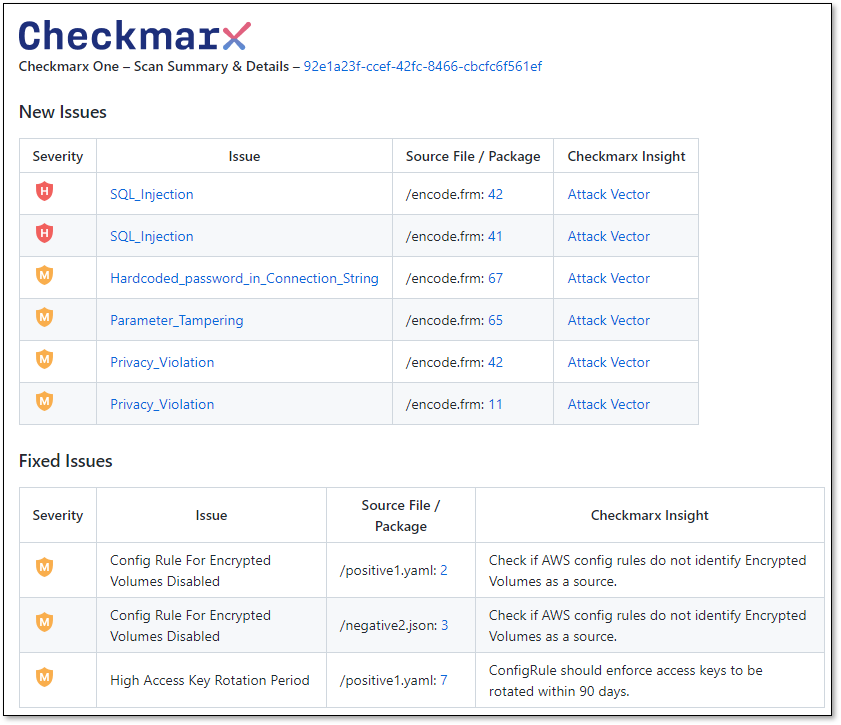
New Issues introduced by the pull request
Fixed Issues resolved by the pull request
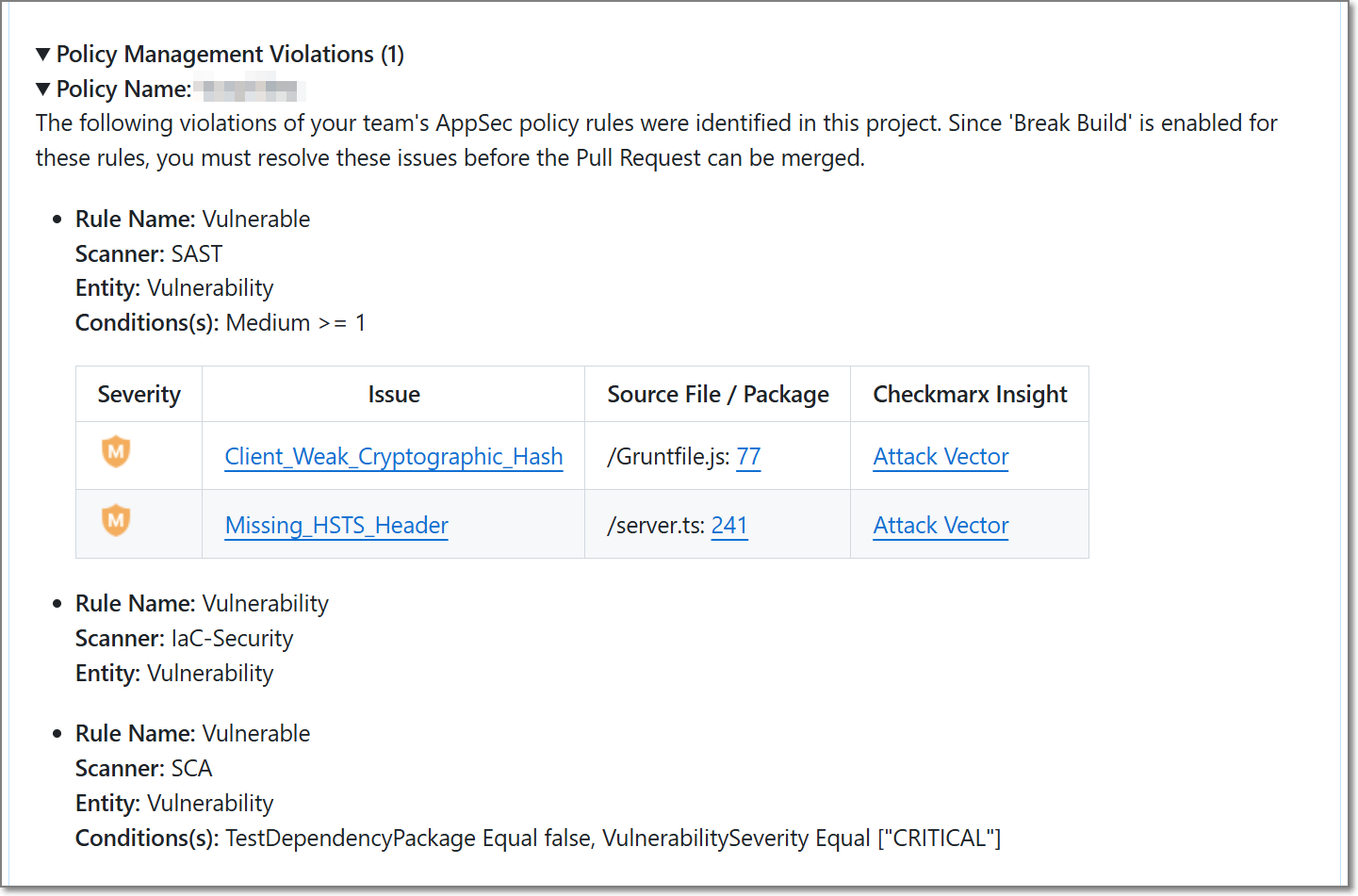
AppSec Policy Management Violations identified in the pull request
The following sections describe how these issue categories are calculated and displayed.
 |
 |
New Issues
New Issues represent vulnerabilities that are present in the source branch but do not exist in the target branch. These findings were introduced by changes included in the pull request and require review before the code is merged.
By focusing on newly introduced vulnerabilities, developers can quickly identify security issues that were added as part of the current development effort.
Fixed Issues
Fixed Issues represent vulnerabilities that exist in the target branch but are no longer present in the source branch. These findings indicate that the pull request contains changes that remediate previously identified security issues.
Fixed Issues provide visibility into the security improvements included in the pull request and help reviewers understand the positive impact of the proposed changes.
Policy Management Violations
Policy Management Violations represent findings that violate one or more AppSec policies applied to the project.
When a policy violation is identified during a pull request scan, the PR decoration may include a Policy Management Violations section containing details about the violated policy and rule. Depending on the policy configuration, additional information such as the scanner that identified the finding and the conditions that triggered the violation may also be displayed.
Policy Management Violations help developers and reviewers identify security governance requirements that may need to be addressed before the pull request can be merged.
AI Triage Report (GitHub and ADO Only)
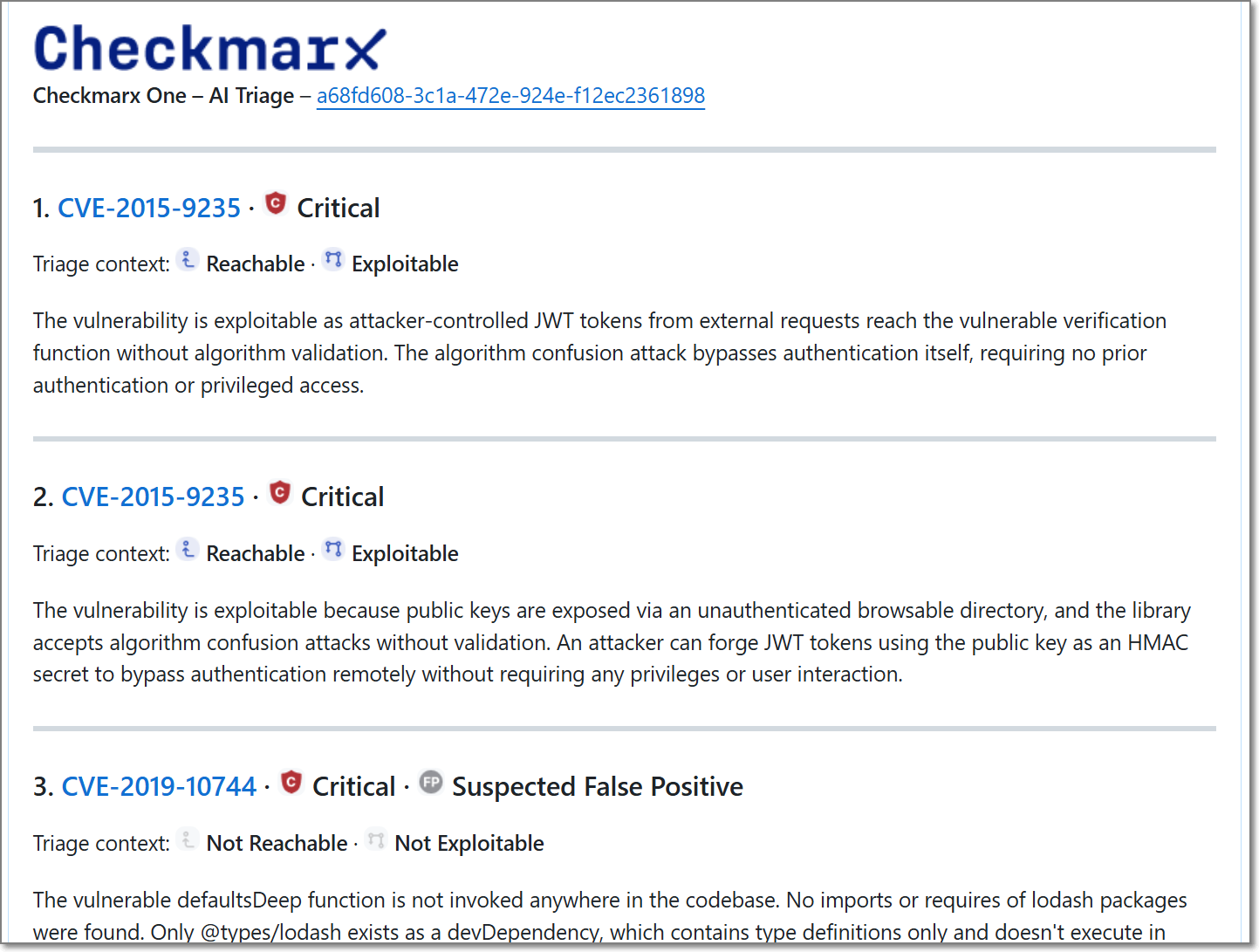 |
For projects with AI Triage & Remediation enabled, the PR decoration includes an AI Triage section.
The AI Triage agent performs an additional analysis of eligible vulnerabilities identified during the pull request scan and provides risk-based context to help teams prioritize remediation efforts. This analysis may include information related to exploitability, reachability, and the effectiveness of existing mitigations.
To keep the report concise, AI Triage analysis is performed on a limited number of vulnerabilities from the pull request. A summary of the analyzed vulnerabilities is displayed directly in the PR decoration, with additional details available through Checkmarx One.
AI Triage analysis helps development and AppSec teams distinguish between findings that represent a practical security risk and findings that are less likely to be exploitable in the running application.
For more information, see AI Triage & Remediation.
PR Decoration New Issues Report
The PR decoration New Issues report summarizes findings identified during the pull request scan. The report contains four columns, although the content of some columns varies by scanner type.
To keep the pull request concise and focused on code review, the report displays only a subset of the identified findings. When additional findings are available, a link is provided to view the complete results in Checkmarx One.
The following sections describe the information displayed for each scanner type.
SAST Scanner Vulnerabilities
Column | Description |
|---|---|
Severity | All the vulnerabilities are sorted according to their severity - Critical, High, Medium, Low, Info |
Issue | Link to the Vulnerability type, including the following information:
NoteThere are cases that a specific vulnerability type is not included in Checkmarx database. In such cases an external link to www.cwe.mitre.org site will be provided containing additional information about the vulnerability. |
Source File / Package | Direct link to the vulnerable source code line in the code repository. |
Checkmarx Insight | Details - A brief description of the vulnerability. Attack Vector - Direct link to the vulnerable source code line in Checkmarx SAST scanner scan results. |
SCA Scanner Vulnerabilities
Column | Description |
|---|---|
Severity | All the vulnerabilities are sorted according to their severity - Critical, High, Medium, Low, Info |
Issue | Link to devhub.checkmarx.com site containing information about the vulnerable package. |
Source File / Package | Vulnerable package name |
Checkmarx Insight | Direct link to the vulnerable package in the Checkmarx One SCA Scanner Results viewer. |
IaC Scanner Vulnerabilities
Column | Description |
|---|---|
Severity | All the vulnerabilities are sorted according to their severity - Critical, High, Medium, Low, Info |
Issue | Vulnerability title. |
Source File / Package | Direct link to the vulnerable source code line in the code repository. |
Checkmarx Insight | Vulnerability description - Limited to 150 characters. |
Azure DevOps-Specific Behavior
Comment Status
Azure DevOps pull request comments include an additional Status field.
Checkmarx One uses this field to indicate whether the PR decoration requires developer attention.
When new vulnerabilities are identified in the pull request, the Checkmarx One PR decoration comment is created with a status of Active.
Some development teams require all active pull request comments to be resolved before a pull request can be merged.
If no new vulnerabilities are identified during the scan, the PR decoration comment is created with a status of Closed.
PR Decorations: Best practices and troubleshooting
The sub-sections below describe the best ways to use and troubleshoot PR decorations in scan results. These tips will help you understand your scan results better, fix any problems, and create high-quality code right from the start of your project.