Preparing for Checkmarx Integration with DevOps Change Velocity
ServiceNow DevOps Change Velocity enables you to import data from your DevOps tools into the ServiceNow platform, accelerating change delivery while ensuring compliance. For more details, refer to the ServiceNow Documentation here: DevOps Change Velocity.
The Checkmarx integration for ServiceNow DevOps provides SAST scan summary data directly within the DevOps module for enhanced visibility. This integration is specifically for Checkmarx SAST . Checkmarx SCA data is not imported through this DevOps integration.
Prerequisites
Before you begin, ensure the following requirements are met:
Required Plugins: The following applications must be installed and activated on your ServiceNow instance. For more information, see Install a ServiceNow Store application .
DevOps Vulnerability Integrations (
sn_devops_vul_ints)Checkmarx CxSAST Vulnerability Integration (
x_chec3_cxsast)
Activate the DevOps Integration: You must enable the specific integration job for DevOps.
Navigate to Checkmarx Vulnerability Integration > Integrations .
Locate Checkmarx DevOps Integration in the list.
Ensure the Active field is set to true.
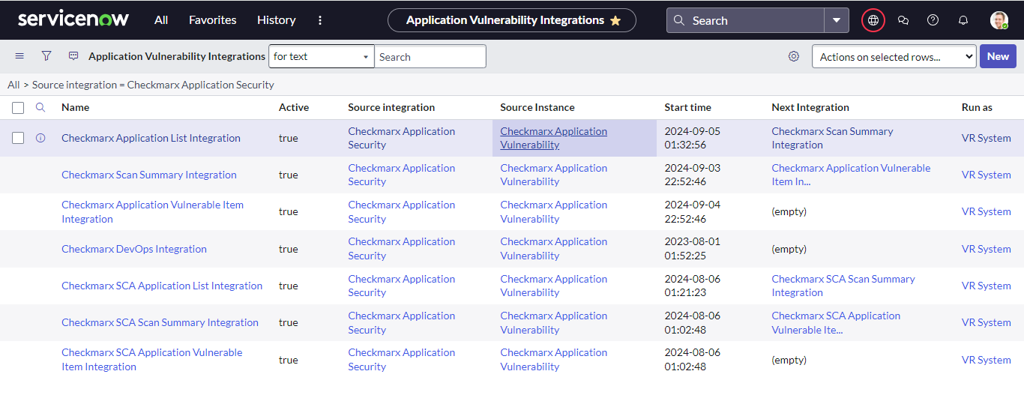
SAST User Permissions: The Checkmarx SAST user must have the complete set of required permissions. For the full list, refer to the "Create a Dedicated SAST User Role" section here.
MID Server: A configured and validated MID Server with connectivity to your Checkmarx SAST instance is required, as described here.
Configuring the Tool in ServiceNow DevOps
The process for connecting Checkmarx SAST as a new tool is performed within the ServiceNow DevOps application. For detailed, step-by-step instructions on this process, please refer to the official ServiceNow Documentation here.
When prompted to enter the tool's connection details, use the information provided in the table below.
Checkmarx SAST DevOps Field Details
Provide the following information when establishing the connection with Checkmarx in ServiceNow DevOps:
Field | Description |
|---|---|
Tool Name | Name of your Checkmarx integration |
Tool integration | Checkmarx SAST |
Server URL | Base URL of your Checkmarx SAST server |
Tool username/ API ID | Checkmarx SAST username. |
Tool password/ Access token / API Key | Checkmarx SAST password. |
MID server | MID server (To install MID server, refer to Checkmarx’s documentation here ) |
Checkmarx DevOps Integration Scan Summary Results
Once the integration is completed, the retrieved scan summaries from Checkmarx SAST are stored in the following tables. You can view them by searching for the table name in the navigation filter:
Table 1: Application Vulnerability Scan Summary (
sn_vul_app_vul_scan_summary)Source Field (from CxSAST)
Columns (from SNOW)
Description
app_name
Discovered Applications
Project Name
scan_id
Source scan ID
Scan ID of the project.
scan_id + last_scan_date
Scan summary name
Scan summary with scan ID and last scan date.
total_no_flaws
Detected Flaw Count
Total number of vulnerabilities
Last scan Date
Last scan date
Last scan date
scan rating
Last scan rating
scan rating
Table 2: Application Vulnerability Scan Summary Details (
sn_vul_app_vul_scan_summary_details)Source Field (from CxSAST)
Columns (from SNOW)
Description
category_name
Category name
Name of the vulnerability category.
severity
Severity
Severity of the flaws in the scan report.
total_no_flaws
Detected Flaw Count
Number of flaws in the category for a severity.