DAST Permissions
To execute various actions in DAST, a user needs to be assigned one of the following permissions:
Permission | Description |
|---|---|
dast-add-notes | Add notes to a scan. |
dast-admin | Manage Environments, Scans, update results, and execute other actions in DAST. |
dast-cancel-scan | Cancel a Scan in DAST. |
dast-create-automation-scripts | Create an automation script in DAST. |
dast-create-environment | Create a new Environment in DAST. |
dast-create-scan | Create a new Scan in DAST. |
dast-delete-environment | Delete an Environment in DAST. |
dast-delete-scan | Delete a Scan in DAST. |
dast-external-scans | CI/CD user for executing actions related to External Workers. |
dast-high-level-update-result-states | Allows for updating result states and propose not exploitable. 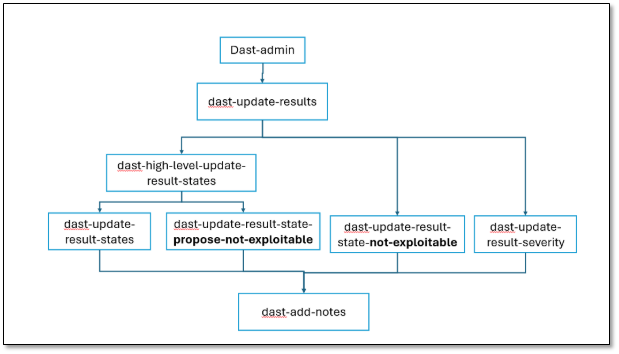 |
dast-update-environment | Update an Environment in DAST. |
dast-update-results | Update results in DAST (severity, comments, etc.). |
dast-update-result-severity | Update a Result Severity. |
dast-update-result-state-not-exploitable | Update a Result State to Not Exploitable. |
dast-update-result-state-propose-not-exploitable | Update a Result State to Propose Not Exploitable. |
dast-update-result-states | Update a Result State. |
dast-update-scan | Update a Scan's properties in DAST. |
dast-view-environments | View a DAST Environment. |
manage-application | Manage an application in DAST. |
view-applications | View an application in DAST. |