Package Upgrade Recommendations
Package Upgrade Recommendations is a new capability within the SCA Results Viewer and the Global Inventory and Risks page designed to help you quickly identify and prioritize safer dependency upgrades. It provides clear, actionable guidance on which package versions to upgrade to, highlights the security impact of each option, and shows how vulnerabilities change between versions. By surfacing this information directly within scan results, it enables faster, more informed remediation decisions. These insights are also available via updated APIs and reports, ensuring consistency across UI and automation workflows.
Packages Tab – Suggested Fix Column
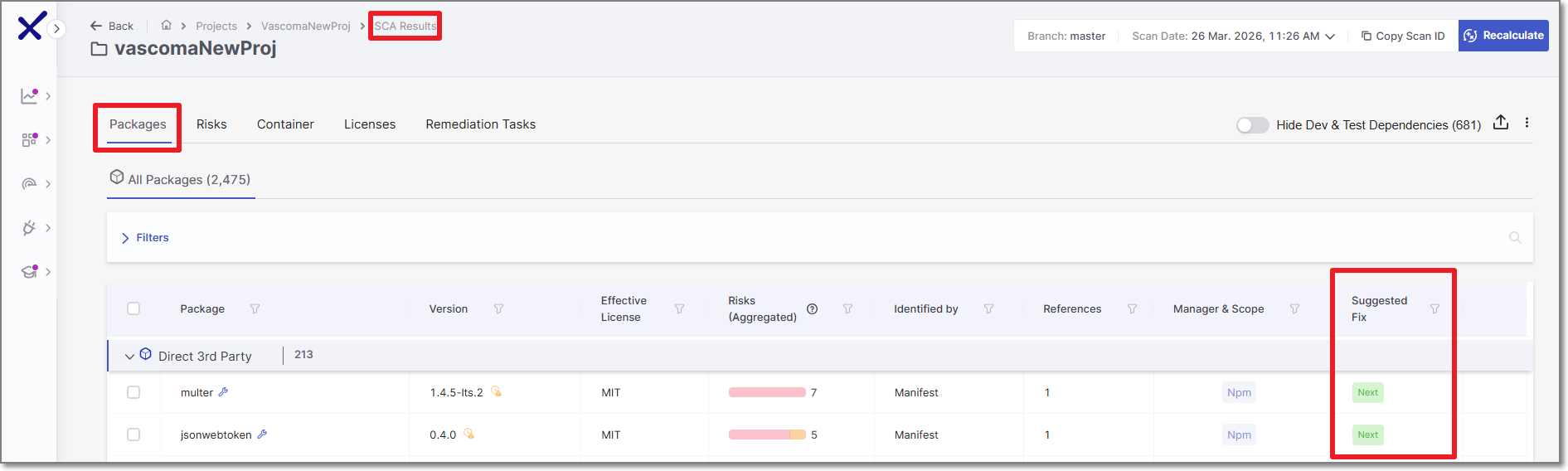
A new Suggested Fix column has been added to the All Packages page of the SCA Results Viewer, providing an at-a-glance indication of upgrade opportunities for each dependency. The column displays one of three values:
None – No vulnerabilities exist, or no better version is available.
Next – A safer version is available.
Latest – Only the most recent version resolves the issue.
This enables faster prioritization and clearer decision-making directly from the results table.
 |
Color-Coded Fix Indicators
The system differentiates between suggested fixes that fully resolve all vulnerabilities in the current package and those that only provide a partial improvement. To make this distinction clear, the Next and Latest indicators are color-coded: green indicates that the recommended version fully resolves all vulnerabilities, while purple indicates that the upgrade improves security but does not completely remediate all issues. This visual distinction allows you to quickly assess the effectiveness of each upgrade option at a glance.
Suggested Fix Tooltip (Hover)
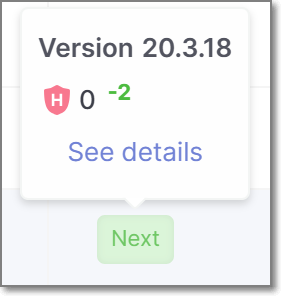
Hovering over the indicator provides additional context, including the recommended version number and a breakdown of how many vulnerabilities are reduced compared to the current version, segmented by severity level. This allows for quick impact assessment without leaving the view.
 |
Package Details Side Panel
Clicking See details opens a side panel with deeper remediation insights. This includes the recommended most secure versions, showing both the next version that resolves the issue and the latest available version. A Version Timeline toggle provides visibility into intermediate versions between the current, next, and latest releases. You can also navigate directly to the AppSec Knowledge Center to explore the full package history and all associated vulnerabilities.
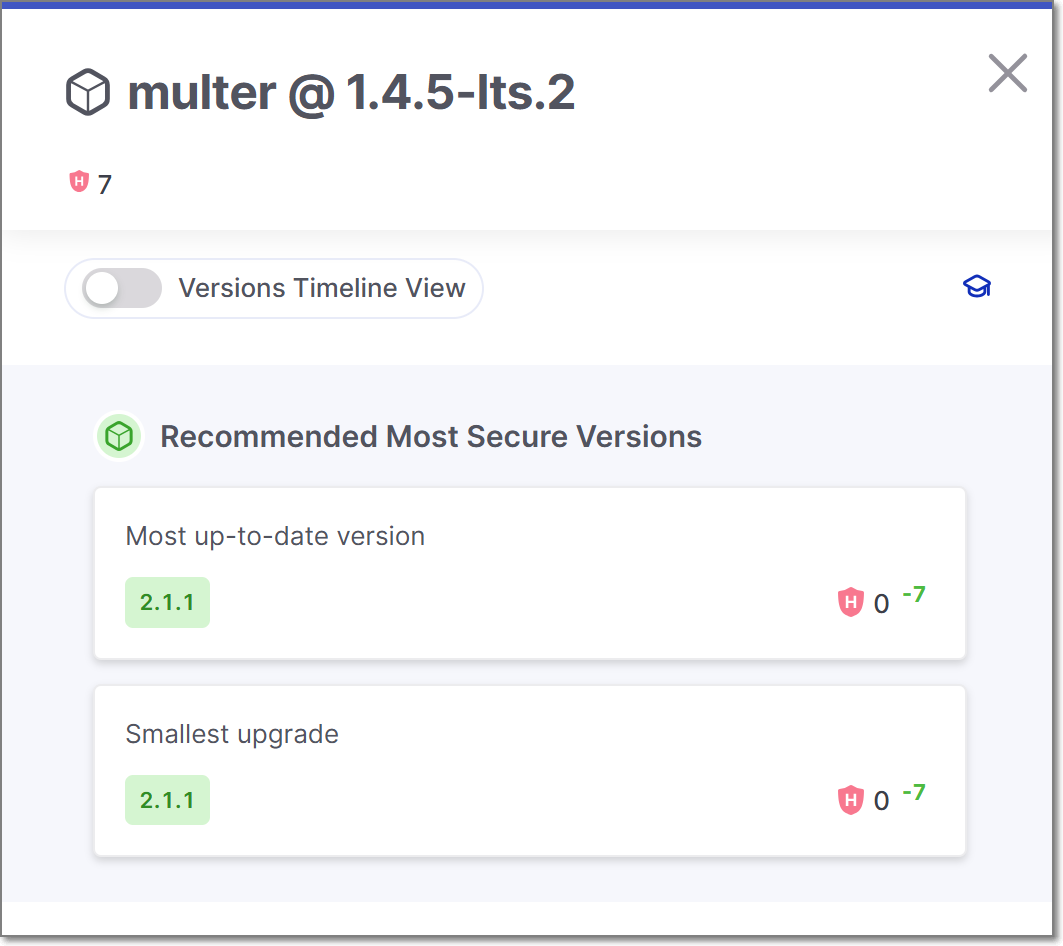 |
Hovering over a recommended version in the side panel reveals a Copy Version option, allowing you to quickly copy the version number and paste it directly into your project configuration for faster remediation.
Risks Tab – Risk Resolution Column
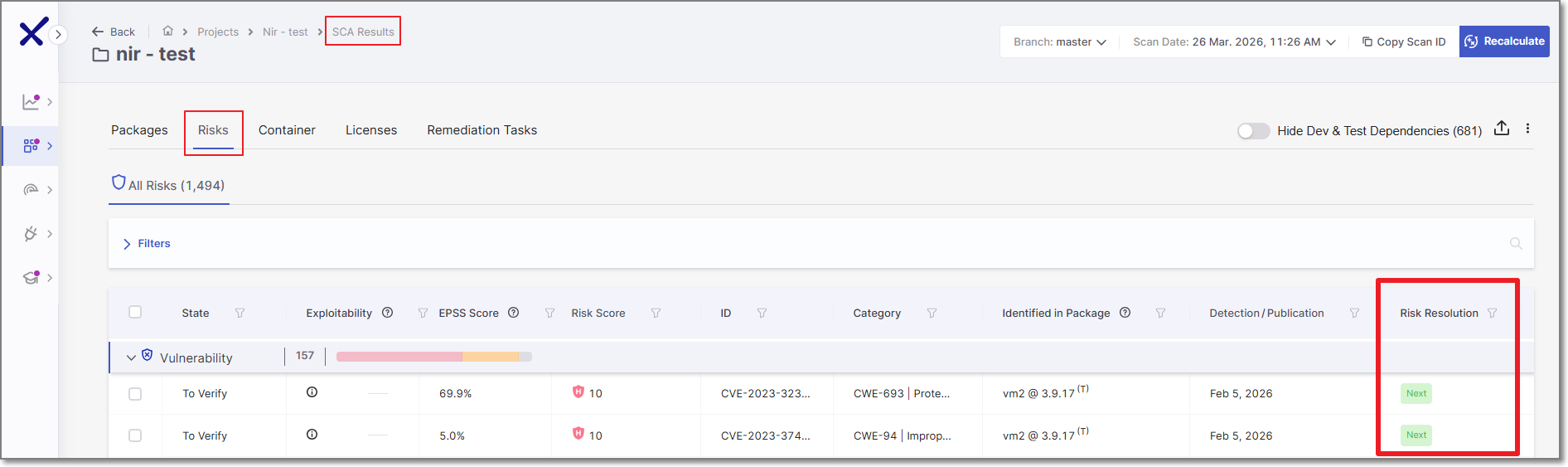
On the Risks tab, a new Risk Resolution column for Vulnerabilities and Suspected Malware risks provides targeted remediation at the individual vulnerability level. The same color coding used in the Packages tab applies here also(green for full fix, purple for partial improvement).
Unlike the Packages view, which focuses on overall package health, this column highlights upgrade versions that resolve a specific vulnerability, meaning different vulnerabilities within the same package may suggest different upgrade versions, and some vulnerabilities may show no remediation options. This gives developers the flexibility to prioritize and choose upgrades based on the specific risks they want to address.
The Risk Resolution column also supports the same interactive capabilities as the Suggested Fix column, including hover tooltips with version and vulnerability impact details, and access to the side panel with recommended versions, version timeline, and links to the AppSec Knowledge Center.
 |
Global Inventory and Risks
The Global Inventory now includes a Suggested Fix column (for packages) and a Risk Resolution column (for vulnerabilities), providing the same upgrade indicators (None, Next, Latest) and color-coded guidance as in the SCA Results Viewer. This allows you to quickly identify safer upgrade options across your entire package inventory.
In this view, the tooltip provides version-level guidance but does not include the detailed vulnerability reduction breakdown, offering a more lightweight experience for high-level analysis.
 |