AI Triage & Remediation
Note
COMING SOON
This capability has not yet been released. This documentation is intended to help stakeholders prepare in advance for adoption of the new capability.
AI Triage & Remediation is an agentic AI capability that dramatically streamlines triage and remediation workflows. In the initial phase, these agents operate directly within GitHub pull requests to help teams evaluate and resolve security vulnerabilities before code is merged. Both triage and remediation actions will be embeded directly within the pull request workflow. This will enable AppSec teams to prioritize findings and developers to remediate them without leaving the PR. The initial release focuses exclusively on pull request–based workflows, with future support planned for backlog triage and remediation within the Checkmarx One platform.
The AI Triage agent evaluates new vulnerabilities identified during PR scans and provides insights into the Reachability and Exploitability of each vulnerability. It incorporates risk context to determine whether the exploitable method is reachable by your application and checks if masking and sanitization measures are in place to prevent exploitation. This allows teams to distinguish between findings that are theoretically vulnerable and those that present a concrete risk in the running application.
The AI Remediation agent complements this by generating ready-to-merge fix pull requests, allowing developers to remediate validated issues directly within the PR workflow.
Together, these capabilities reduce manual analysis effort and accelerate remediation without disrupting the development process.
Requirements
Your repos are hosted on GitHub
You have a Checkmarx Credits license with sufficient available credits allowance
Limitations
Currently supported for the SAST and SCA scanners only
Supported only for GitHub Code Repository Integration projects
Triage runs on max. 10 vulnerabilities per PR
Max. 5 remediation actions per request
Enabling AI Triage & Remediation
AI Triage & Remediation is configured at the project level in the Checkmarx One web application (UI). It can be enabled during project creation, or at a later time by updating the project settings. Users control which projects have AI Triage & Remediation enabled and which severity vulnerabilities are included in the triage analysis and remediation workflow.
In the Workspace
 > Projects screen, hover over the desired code repository integration project's row, click on More Options
  > Project Settings.
In the Project Settings, navigate to the Code Repository tab.
In the permissions section, activate the toggle for AI Triage & Remediation.
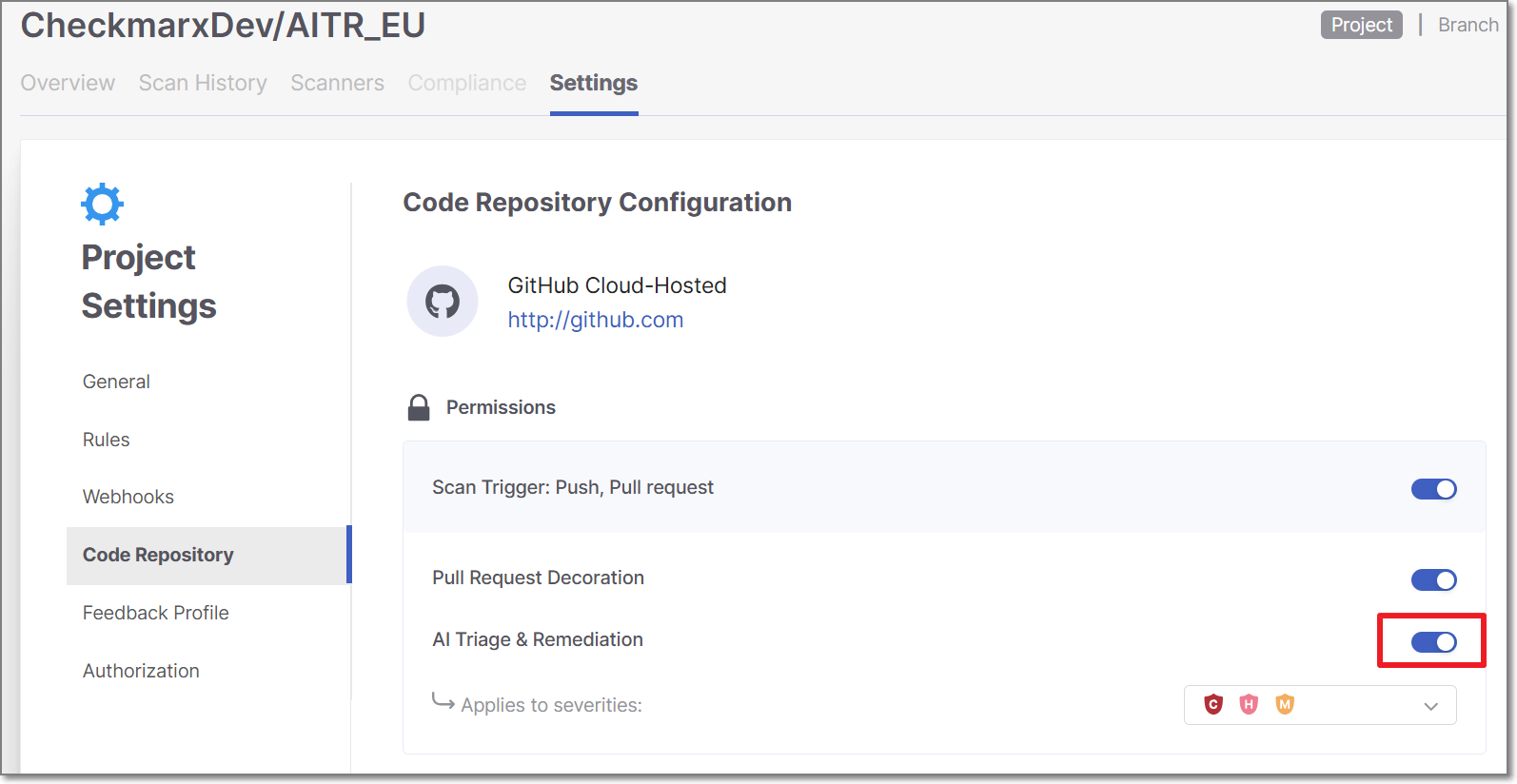
A confirmation dialogue is displayed.
Click Activate to enable the feature.
For the Applies to severities threshold, select the severity levels that this feature will apply to.
Click Save.
AI Triage & Remediation Workflow
Enable Triage & Remediation for a project
Enable AI Triage & Remediation for a Checkmarx One Code Repository Integration project, as described above.
Create a pull request
In GitHub, open a pull request from a feature branch into a branch that is associated with the Checkmarx project where you enabled AI Triage & Remediation.
Checkmarx One scan runs and triggers triage
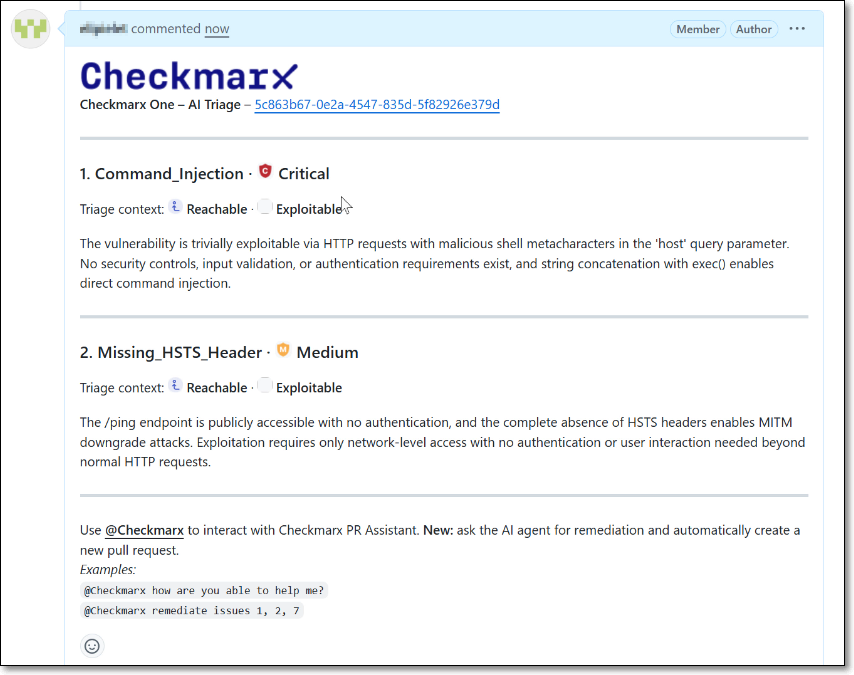
A Checkmarx scan runs on the pull request. The results are added as a comment through PR decoration, including a table of New Issues (vulnerabilities introduced in this PR) and Fixed Issues (vulnerabilities that were resolved in this PR).
The AI Triage agent automatically analyzes each of the New Issues that meet the designated severity threshold and the PR decoration shows the results of the Triage analysis.
Trigger remediation for a vulnerability
Request a fix for one or more a vulnerabilities by submitting a comment with
@checkmarxfollowed by a natural language request for remediation, e.g.,@checkmarx remediate issue 1or@checkmarx fix all issues.Notice
If you request remediation for multiple vulnerabilities, a separate PR is created for each remediation.
Review remediation output
The Remediation agent responds with a comment indicating that a remediation pull request has been created. A link is provided to view the generated pull request.
Open the remediation pull request, and review the suggested code change.
Merge the remediation changes
If you approve the changes, merge the fixed branch into the source branch of your original pull request.
Complete the original pull request
Once the required fixes are applied, proceed with merging the original pull request according to your standard workflow.
AI Triage & Remediation Analytics Dashboard
To view usage and impact metrics, navigate to  ASPM > Analytics > AI Assist Usage > AI Triage & Remediation Dashboard in the Checkmarx One web application.
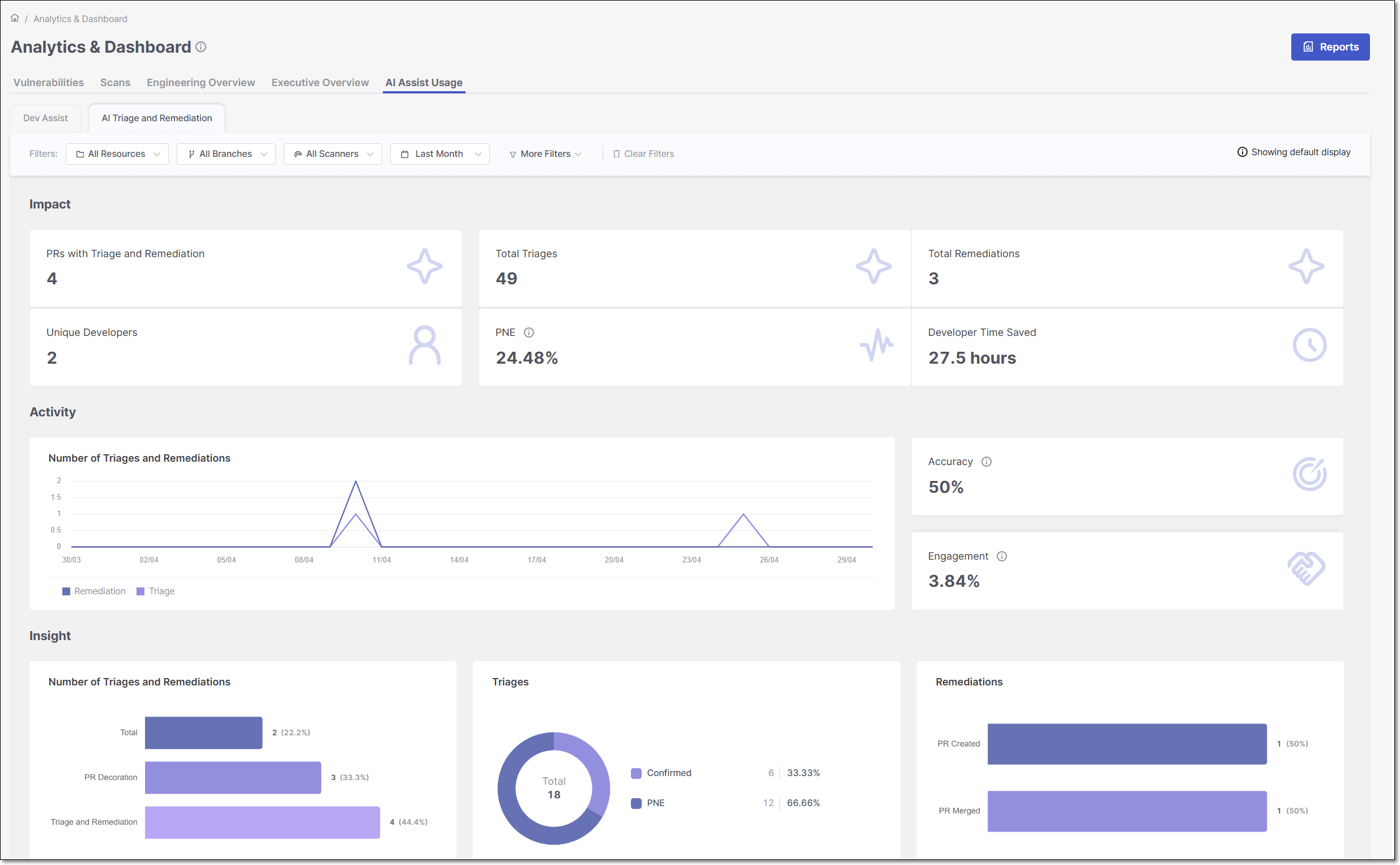 |
The AI Assist Usage > AI Triage & Remediation dashboard provides visibility into how AI Triage & Remediation is being adopted across your organization. The metrics show the volume of AI triage and remediation activity, including the number of pull requests analyzed, total triages performed, and remediation actions generated. They also provide visibility into outcomes such as triage decisions, remediation status, accuracy, engagement, and estimated time savings. This helps teams understand adoption, usage patterns, and the overall impact of AI Triage & Remediation across projects over time.